
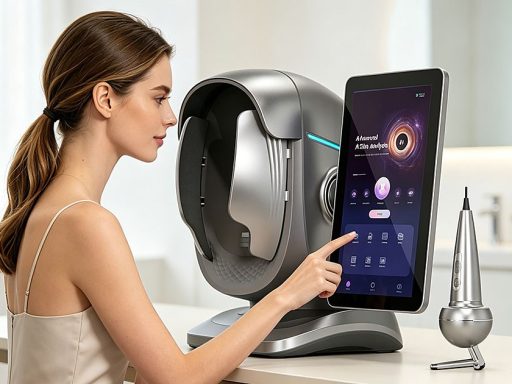
An AI skin analyzer machine has quietly become one of the highest-leverage purchases a clinic or spa can make. It costs a fraction of a laser platform, takes up less floor space, and yet it touches every client who walks through the door — because every treatment plan starts with a skin assessment. When the analysis looks professional, the recommended treatment and the home-care products that follow look professional too.
The problem is that specification sheets for these machines read like a wall of near-identical numbers: spectra, indicators, pixels, languages. Two analyzers can both say “8 spectra” and still produce completely different reports, workflows and client experiences.
This guide breaks down what actually separates one AI skin analyzer machine from another, so you can compare models on the factors that will still matter twelve months after delivery — not just on the headline numbers.
What an AI Skin Analyzer Actually Does in a Clinic
Before comparing specifications, it helps to be clear about the job the machine is doing in your business. A modern AI skin analyzer captures standardized images of the client’s face or scalp under controlled lighting, runs those images through an analysis engine, and returns a structured report: overall score, skin age, hydration level, pigment distribution, sensitivity, acne grading, wrinkle and pore scoring, and a severity ranking of problem areas.
In practice the machine does three jobs at once:
- Assessment support — it converts what the therapist sees in good lighting into quantified, trackable indicators, so “your skin looks dehydrated” becomes a number the client can see and a baseline you can re-test.
- Sales conversion — a visual report with severity scores and predicted skin age gives the consultation a structured anchor. Clients understand a report better than an opinion, and the same report justifies the treatment plan you recommend.
- Retention and proof — before-and-after comparison reports turn one treatment into a series. When the client can see the pigment score drop across three visits, the next package sells itself.
Machines differ mainly in how well they serve each of those three jobs — which is what the rest of this guide compares.
The Spectra Question: How Many Lights Do You Actually Need?
The single most advertised number on a skin analyzer spec sheet is the spectra count. It is also the most misunderstood.
Each light mode reveals a different layer of information about the same patch of skin:
- ضوء أبيض shows the surface — texture, fine lines, open pores, general condition.
- Cross-polarized light removes surface glare so the camera sees sub-surface redness and capillaries instead of reflections.
- Parallel-polarized light does the opposite: it emphasizes the surface, which sharpens texture detail.
- الأشعة فوق البنفسجية highlights what the surface hides — sebum activity in pores, and fluorescent signatures associated with certain pigment behavior.
- Wood’s light is the classic dermatology lamp; it is used to assess pigment distribution and epidermal versus deeper pigment.
- RBX red and brown maps use red-brown light absorption to separate vascular conditions (red) from pigment conditions (brown) in two dedicated maps.
- A black-and-white structural map isolates pore and texture geometry without color interference.
An 8-spectra machine covers all of these modes. A 3-spectra machine typically covers white light, one polarized mode and UV — enough for basic hydration checks and surface grading, but it will not separate vascular from pigment concerns with the same confidence.
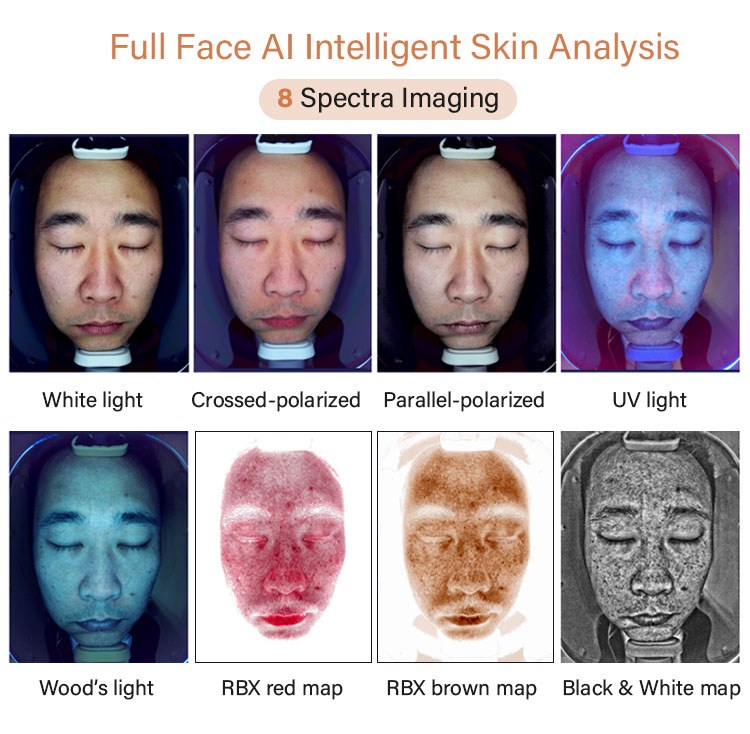
A practical way to decide: if your clinic runs treatment programs that target pigment, redness or acne, the dedicated maps of an 8-spectra platform directly feed your consultation. If you mainly want a quick skin-age score to open conversations, 3 spectra will do the job at a lower investment.
Face-Only, Scalp-Only, or Dual Analysis?
The second decision has nothing to do with electronics — it is about which chair the machine sits next to.
Running a scalp-first service as well? Our scalp analysis machine buyer guide covers the head-spa side of the same equipment family — spectra, magnification, handles and therapy hardware.
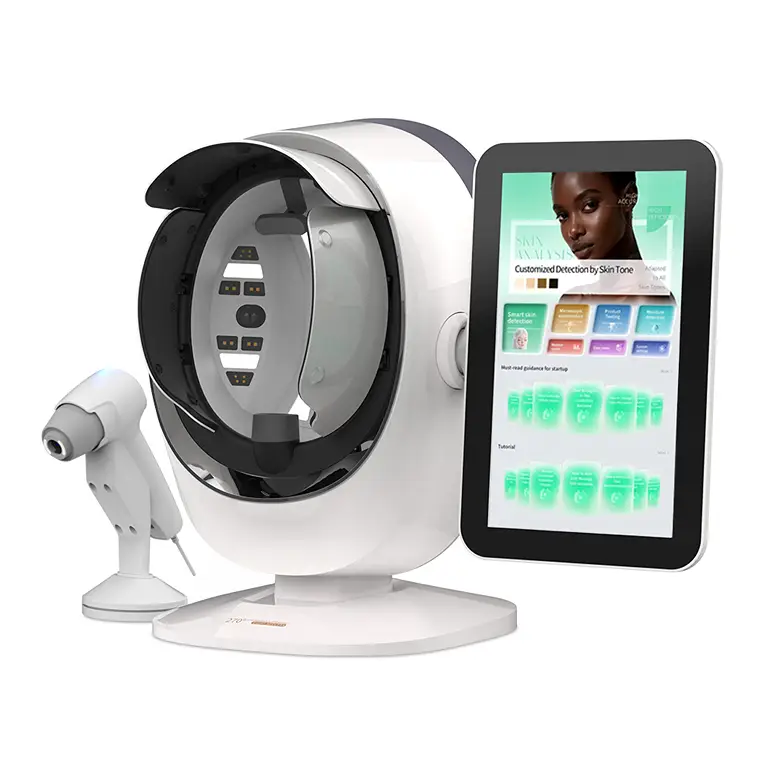
Face-first businesses — facial clinics, medispas, beauty salons — need fast, repeatable facial analysis with a large capture surface and 3D positioning. Machines like the JC091 AI Skin Analyzer with Handheld Detector و X5 Pro Multi-spectrum AI Skin Analyzer Machine are built around the face: the client rests the chin on a support, the head-unit captures the face under each spectrum in sequence, and the foldable arm adjusts height per client.
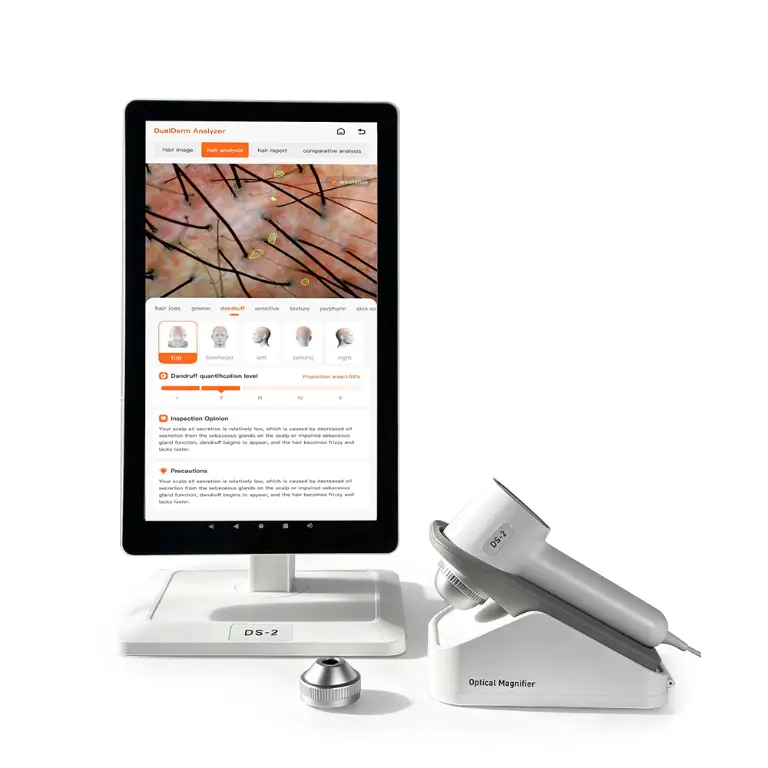
Scalp-first businesses — hair salons, trichology studios, hair-loss treatment centers — live or die by the magnified view of the scalp and follicle. What matters here is not the facial capture arm but the microscope handle: a 50X lens for area-level scalp condition and a 200X lens for individual follicle and hair-shaft detail. The 2 in 1 JC084 AI Scalp Analyzer Machine pairs both magnifications in one platform, which is why it has become one of the most requested scalp machines from buyers.
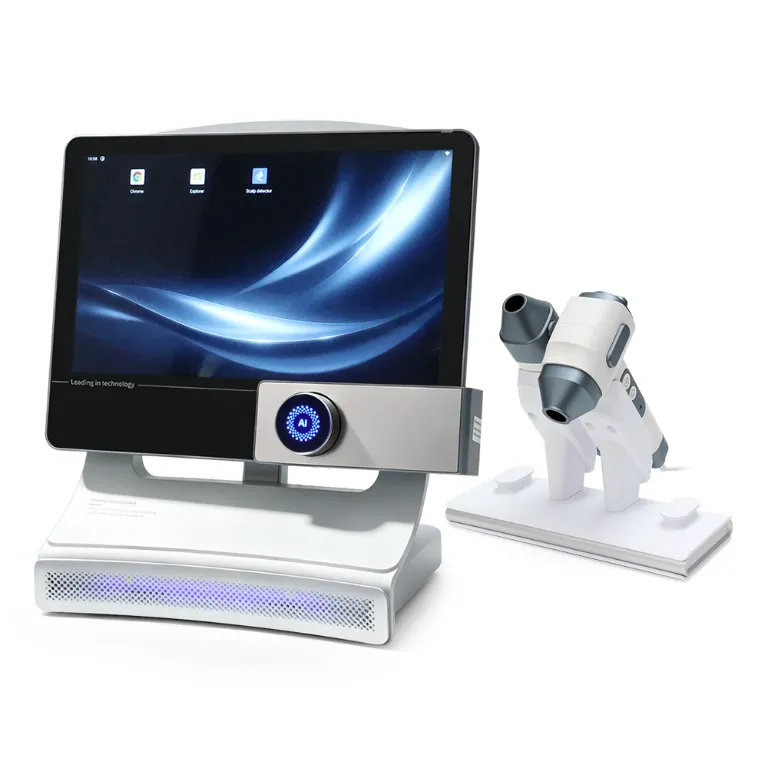
Dual businesses — increasingly the norm, since a hair salon that adds facial services raises average ticket without new floor space — should look at machines that treat both sides as first-class citizens rather than bolting a scalp probe onto a face machine. The JC089 AI Skin Image Analyzer with Scalp Analysis runs full facial analysis and adds scalp and hair analysis in one workflow, while the JC088 Dual-Dimensional Hair Scalp & Skin Detector Analyzer approaches the same goal from the scalp side with two swappable probes and a 15.6-inch touchscreen.
Handles, Camera and Hardware: The Specs That Decide Report Quality
Once you know your spectra count and analysis type, the remaining hardware choices are easier to rank.
Camera pixel count is the foundation. Every indicator in the report is computed from captured images, so a low-resolution sensor produces vague severity scores no matter how good the AI layer is. Professional-grade analyzers now ship with industrial cameras in the 36-megapixel class — found on machines like the JC091 and JC089 — which is enough resolution for the analysis engine to grade a single pore zone rather than a whole cheek region. Treat camera class as a hard floor, not a bonus.
The microscope handle defines scalp capability. If scalp work matters to you, check three things: the magnification range (50X for area view, 200X for follicle detail), whether a moisture probe is integrated, and how the handle is stowed. Magnetic dock handles like the JC088’s keep the probe charged and out of the way between clients.
Display size and foldability affect throughput, not quality. A 15.6-inch 1920×1080 touchscreen has become the standard for this category — big enough to review the report with the client standing next to you. What differs is the arm: machines like the JC091 fold flat and let the screen tilt back 90 degrees, which matters when the client needs to see the report during the consultation rather than after it.
Platform and memory determine long-term smoothness. Most current analyzers run Android on quad-core ARM hardware with 4GB RAM and 32GB storage. That is adequate for capture and reporting. What separates machines over years of daily use is the software layer on top: how fast the analysis runs, how stable the camera driver is, and how the vendor ships updates.
Language count matters more for multi-market operators. If you run rooms in different countries or serve international clients, language support ranges from 5 languages on the JC088 up to 24 on the JC089 — with the JC091 and JC087 covering 19. Check the exact list for your market, not just the total count.
Reports, Cloud Management and Multi-Location Support
This is the section most buyers skip and most operators later wish they had read.
The report is the deliverable your client actually takes away. Across the current generation of machines, look for:
- A structured report, not just images — overall score, skin age, hydration grading, per-indicator scoring and a severity ranking of problem areas, as produced by platforms like the JC087 Intelligent Scalp Facial Tester Skin Analyzer.
- Before-and-after comparison — the ability to place two capture dates side by side on any single indicator. This one feature is what turns the analyzer from a one-off gadget into a series-selling tool.
- Output flexibility — QR code so the client opens the report on their own phone, printed report for the consultation folder, and cloud storage so nothing lives only on one machine.
- Cloud backend and multi-store management — if you operate more than one location, a cloud system lets a head office review client files across rooms, keeps data consistent when staff rotate, and protects your client database if a machine fails. Konmison’s analyzers include free cloud service with QR-code report sharing and centralized client and product management.
- Product recommendation linkage — higher-end platforms can map detected concerns to your own product or treatment menu inside the report, which turns the analysis directly into a recommendation.
Matching the Machine to Your Business Model
Use this table to shortlist before you dive into full spec sheets:
| Your business | Priority features | Machines to compare |
|---|---|---|
| Facial clinic / medispa | 8 spectra, 36 MP camera, 3D face capture, before/after reports | JC091, JC089, JC081 (10-spectra) |
| Hair salon adding scalp services | Microscope handles (50X + 200X), moisture probe, scalp grading | JC084, JC088 |
| Dual facial + scalp operator | Both workflows in one machine, one report system | JC089, JC088, JC091 |
| Multi-location operator | Cloud backend, multi-store management, QR reports | JC091, JC089 |
| Boutique or mobile service | Compact footprint, folding arm, light weight | JC091 (folded 45.1×40.8×53.5 cm, 9.4 kg), JC088 (4.2 kg) |
The Konmison Detection Lineup at a Glance
For reference, here is how the current lineup compares on the dimensions discussed above:
| الماكينة | Analysis scope | أطياف | Indicators | المقابض | اللغات |
|---|---|---|---|---|---|
| JC091 AI Skin Analyzer | Facial skin + scalp | 8 | 18 | Microscopic handle, 1 | 19 |
| JC089 AI Skin Image Analyzer | Skin + hair + scalp | 8 | 20+ | 1 (JC089B adds microscope) | 24 |
| JC087 Scalp Facial Tester | Facial + scalp | 8 | 19 | مسبار مجهري | 19 |
| JC088 Dual-Dimensional Detector | Hair scalp + facial skin | 3 | Multi-dimensional | 1 (50X HD lens, 2 replaceable probes) | 5 |
| JC084 AI Scalp Analyzer | Hair + scalp | 3 | 13 | 2 (50X + moisture, 200X) | 15 |
Beyond these five, the full skin analyzer machine category also includes the M17, X5 Pro and 10-Spectra face analyzers, plus the 2 in 1 3D A6 Intelligent AI Face Skin Analyzer و AI Skin Analyzer Designed for Apple System for operators already invested in that ecosystem.
For a purchase-oriented view of the same lineup, our roundup of the best skin analyzer machines for sale lists the models available to order.
What to Ask a Supplier Before You Order
A specification comparison tells you what a machine can do on paper. These questions tell you what owning it will be like:
- Can I see a live demo video of the full workflow — capture, analysis, report, QR sharing — rather than a rendered product film? The gap between the two is where disappointment lives.
- What exactly does the cloud subscription include, and for how long? Capture limits, storage duration, and whether multi-store management is included or an add-on.
- How are software updates delivered, and does the analysis engine improve over time or stay frozen at delivery?
- What is included in the box — printer, spare probes, chin rest covers, and which consumables you will need to reorder.
- OEM options: if you operate a brand, ask what can be customized — housing, boot logo, report layout, interface language set — and the minimum order behind each option.
- Lead time and training: how the machine ships (most fold for safer transit), and what training material comes with it.
As a factory-direct manufacturer, Konmison supports OEM and ODM customization across the analyzer line, and the team can arrange live video demonstrations of any machine in this guide — start with the contact page and mention which models you want to see running.
الأسئلة الشائعة
How many spectra should a professional skin analyzer have?
For clinics targeting pigment, redness or acne programs, 8 spectra is the professional standard — it includes dedicated vascular and pigment maps (RBX) plus Wood’s light. For quick skin-age scoring and basic consultations, 3 spectra (white, polarized, UV) covers the essentials at a lower investment.
Can one machine analyze both facial skin and scalp?
Yes. Machines like the JC089 and JC088 run facial and scalp analysis in one workflow, and the JC091 adds a microscopic handle to its facial capture. The trade-off is focus: a scalp-dedicated machine like the JC084 offers 50X/200X magnification that general face analyzers do not.
Do I need a microscope handle?
If you sell scalp or hair-loss treatments, yes — magnified follicle views are the core of that consultation. If you run a facial-only menu, the main capture unit covers your needs and the handle is optional.
What camera specification should I look for?
Treat an industrial-grade 36-megapixel camera as the current professional standard. Lower-resolution sensors limit the analysis engine to broad zones instead of precise per-area grading.
How do before-and-after comparison reports work?
The machine stores each client’s capture in a cloud or local file. On the next visit, you select two dates and the report places both captures side by side for any single indicator — hydration, pigment, pores — giving the client visible proof of progress.
How does multi-store cloud management help a growing business?
A cloud backend keeps all client files, capture history and product recommendations in one system across locations. Staff at any branch can pull up the same client record, head office can review performance by store, and data survives a machine replacement.
Which languages do AI skin analyzers support?
It varies widely: from 5 languages on the JC088 to 24 on the JC089, with 15–19 on most other models. Confirm the exact language list covers your market before ordering.
Can the analyzer recommend products or treatments?
On higher-end platforms, yes — detected concerns can be mapped to a treatment or product menu inside the report, so the recommendation follows the assessment automatically.



 EN
EN  RU
RU  ES
ES  IT
IT  AR
AR  FR
FR  DE
DE  JA
JA  KO
KO  NL
NL